GUIDE · 5 MIN READ
Why old camcorder footage has jagged lines (and how to fix it)
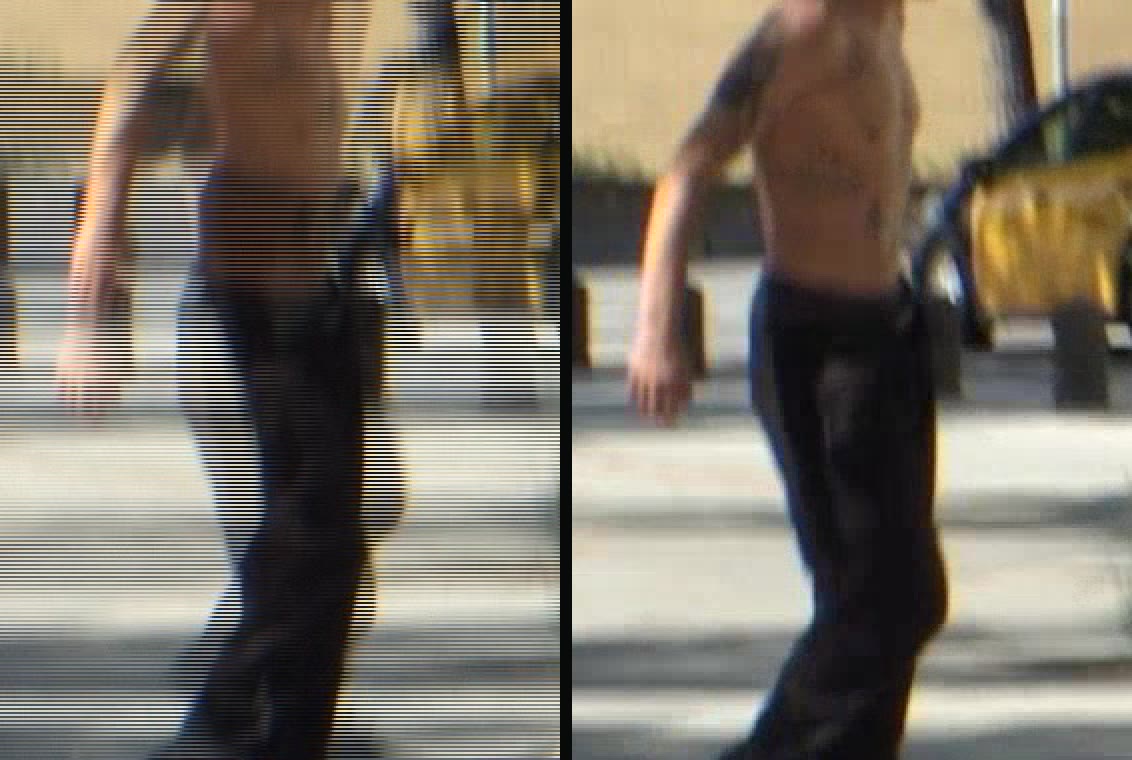
You copy an old tape onto your computer, press play, and everything that moves has thin horizontal lines through it, like the edge of a comb. Nothing is wrong with your tape. You're seeing interlacing, and it can be fixed.
What interlacing is
Camcorders like MiniDV, Digital8 and Hi8 were made for TVs. Instead of recording whole pictures, they record fields: half-pictures made of every other line. In Europe (PAL) that's 50 fields a second, in the USA and Japan (NTSC) about 60. One field has the odd lines, the next has the even lines, recorded a moment later.
An old CRT television drew those fields one after another, so movement looked silky smooth. A phone or computer screen shows whole frames instead, so the two fields have to be turned into frames somehow.
Why the lines appear
A DV file stores two fields woven together in each frame, 25 frames a second. If nothing moves, the two fields line up and you can't tell. If something moves, it has moved between the two fields, so every other line shows it in a slightly different place. That's the comb.
How typical converters handle it
Do nothing
The fields stay woven together. Jagged lines on everything that moves.
Blend the fields
The lines go, but moving things get a see-through double image (ghosting).
Throw one field away
Clean, but only 25 pictures a second: half the motion is gone and it looks choppy, with less vertical detail.
The proper fix: every field becomes a frame
A good deinterlacer rebuilds each field into a full picture, using the fields just before and after it to fill in the missing lines. You get 50 full frames a second (60 for NTSC): all the motion that was recorded, with no lines and no ghosting. This is called field-rate or "double-rate" deinterlacing, and the result is labelled 50p.
Two details matter:
- Field order. DV records the lower field first. Get it backwards and motion judders back and forth.
- Quality of the deinterlacer. Simple ones leave shimmering on fine detail. Better ones (like bwdif or yadif, and QTGMC for those who want to tinker) look at neighbouring fields to rebuild clean edges.
That's exactly what dv2mp4 does: field-aware deinterlacing to 50p, the right field order for DV, and square pixels. For how the whole conversion works, see How to convert MiniDV tapes to MP4.